O Elementor Website Builder tem tudo: construtor de páginas com recurso de arrastar e soltar, Editor Atômico, design com precisão em pixels, sistemas de estilo globais e reutilizáveis, compatibilidade com dispositivos móveis…

SureForms – Contact Form, Payment Form, Survey & Other Custom Form Builder
Hospedagem WordPress com plugin SureForms
Onde hospedar o plugin SureForms?
Este plugin pode ser hospedado em qualquer provedor que possua WordPress configurado. Recomendamos escolher um provedor de hospedagem confiável, com servidores otimizados para WordPress, como o serviço de hospedagem da MCO2.
Hospedando o plugin SureForms em um provedor de confiança
A MCO2, além de instalar o WordPress na versão mais nova para seus clientes, oferece o plugin WP SafePress, um mecanismo exclusivo que salvaguarda e melhora seu site simultaneamente.
Por que a Hospedagem WordPress funciona melhor na MCO2?
A Hospedagem WordPress funciona melhor pois a MCO2 possui servidores otimizados para WordPress. A instalação de WordPress é diferente de uma instalação trivial, pois habilita imediatamente recursos como otimização de imagens e fotos, proteção da página de login, bloqueio de atividades suspeitas diretamente no firewall, cache avançado e HTTPS ativado por padrão. São plugins que potencializam seu WordPress para a máxima segurança e o máximo desempenho.
SUREFORMS – THE BEST AI-ASSISTED WORDPRESS FORM BUILDER
★★★★★
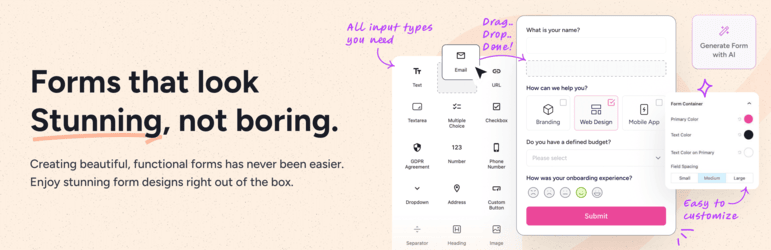
SureForms is the most beginner-friendly WordPress form builder, designed to help anyone create contact forms, payment forms, surveys, quizzes, multi-step forms, and conversational forms without writing a single line of code. Powered by AI and built natively on the WordPress block editor, SureForms makes building any form on your WordPress site fast, intuitive, and beautiful.
Trusted by 500,000+ websites, SureForms is the modern alternative to traditional contact form plugins — purpose-built for speed, design, and conversions.
👉 Try the live demo of SureForms
CREATE BEAUTIFUL RESPONSIVE FORMS USING WORDPRESS BLOCK EDITOR (GUTENBERG EDITOR) WITHOUT CODING ⚡
Our mission at SureForms is to empower you to build beautiful WordPress forms without any code.
We’re taking a fresh approach with Gutenberg, WordPress’s native drag-and-drop builder, to make creating contact forms and custom forms seamless and intuitive — with no new interface to learn.
SureForms is a beginner-friendly WordPress form plugin that makes building contact forms and other high-converting custom forms fast and simple, with advanced features like multi-step forms, conversational forms, payment forms, conditional logic, calculations, native integrations, and more.
Good design and user experience are crucial for forms. Yet many website owners struggle to make their forms blend seamlessly with their site’s look and feel, often leading to lower response rates.
In this regard, SureForms addresses several pain points commonly experienced by WordPress users:
- Complex Process of Form Building
- Design Limitations
- Lack of Mobile-friendliness and Accessibility
- Limited Engagement in Their Forms
- Spam and Security Issues
SureForms is packed with features to address these pain points of WordPress users.
POWERFUL FEATURES OF SUREFORMS 💪
Below are some of the top features SureForms offers:
Native WordPress Form Builder (No New Editor to Learn)
SureForms uses WordPress’s native block editor for a seamless drag-and-drop form building experience. There’s no separate interface, no proprietary builder, and no learning curve — just the WordPress editor you already know.
It’s fast, simple, and the most beginner-friendly form builder for WordPress.
AI Form Builder for WordPress
SureForms is the first AI-powered form builder for WordPress, making form creation faster and smarter. From simple contact forms to advanced calculators, the SureForms AI handles the details, offers smart field suggestions, and helps you build functional, user-friendly forms in just a few clicks.
Here are a few examples of forms you can create with SureForms AI:
- Contact Form
- Feedback / Survey Form
- Event RSVP Form
- Job Application Form
- Newsletter Form
- Support Form
- Payment Forms
- Calorie Counter
- Calculators
- Conversational Forms
No-Code Form Builder with Advanced Logic
SureForms makes advanced features like conditional logic, multi-step forms, query parameters, and more simple to use through a no-code interface. This empowers anyone to create powerful, interactive WordPress forms without writing a single line of code.
WordPress Payment Forms with Stripe and PayPal
SureForms supports a built-in Payment Forms feature. With SureForms, anyone can easily create full-fledged donation forms, event registrations, product checkouts, or any kind of form that needs to accept payments — all without relying on any extra add-on or third-party plugins. This makes collecting payments seamless, secure, and effortless directly through your WordPress forms using Stripe. PayPal payments are available with SureForms Business.
Here are a few examples of how the Payment Forms feature in SureForms can power your forms:
– Donation Form
– Photography Packages Booking Form
– Monthly Membership Plan Form
– Web Design Packages Booking Form
Instant Forms (Shareable Form Links — No Embed Needed)
With SureForms’ own Instant Form feature, you can publish forms with a unique shareable URL. No page, no shortcode, no embedding needed. Share the link anywhere — email, social, SMS — and make your forms instantly accessible.
Mobile-Friendly Responsive Forms
SureForms recognizes the importance of mobile-friendly forms. Every form created with SureForms is designed with a mobile-first approach, ensuring it looks and functions flawlessly on phones, tablets, and desktops alike.
Multi-Column Form Layouts
SureForms makes it easy to arrange input fields into multiple columns for a clean, efficient form layout. This makes your forms look organized, visually appealing, and encourages higher completion rates. You can customize the columns to fit your design.
15+ Form Input Fields
SureForms comes with 15+ fields to build your form:
- Text Field
- URL
- Textarea
- Multiple Choice
- Checkbox
- GDPR Agreement
- Number Field
- Phone Number
- Dropdown
- Address Field
- Custom Button
- Separator
- Heading
- Image
- Icon
Inline Form Validation in Real-Time
Real-time validation for form fields provides instant feedback to users if they enter incorrect or incomplete information. This ensures data accuracy and enhances the user experience on every form submission.
GDPR-Compliant WordPress Forms
Ensure your forms are GDPR compliant and protect user data by simply enabling the built-in GDPR setting.
Anti-Spam Forms (reCAPTCHA + Honeypot)
Protect your WordPress forms from spam with built-in measures like Google reCAPTCHA and Honeypot fields. These ensure submissions are genuine, block bots, and keep your forms secure without bothering your users.
Personalized Confirmation Messages and Redirects
SureForms provides options for setting up customized confirmation messages or redirections that are displayed to users after successful form submissions.
Tailor these messages to provide personalized feedback or redirect respondents to specific pages.
Email Notifications for Every Form Submission
Configure customized email notifications triggered by form submissions. Specify recipients, email templates, and personalized messages to stay informed and automate communication.
Form Entries Management Inside WordPress
Stores form entries securely so you can access and manage form submission data right inside your WordPress dashboard. You can review, export, or perform actions on form entries as needed — no external service required.
Visual Data Reporting and Form Analytics
Analyze and gain insights from form submissions through interactive charts, graphs, and data visualizations. Take data-driven decisions from your WordPress dashboard.
Developer-Friendly Customization
SureForms gives developers clean APIs, hooks, and well-structured code, making it easy to customize, extend, and integrate forms with other systems, plugins, or themes.
Premium Features of SureForms 🔥
SureForms Business unlocks advanced capabilities for power users, agencies, and businesses. Here’s everything you get:
Advanced Form Types
Conversational Forms:
Chat-like forms, one question at a time, for higher conversions and lower drop-off rates.
Multi-step Forms:
Bite-sized forms with progress indicators, reducing form fatigue and boosting completion rates.
Quiz Forms:
Create scored quizzes and personality tests with result output and grading.
Conditional Logic Forms:
Show or hide fields, customize email notifications, and display different confirmation messages based on users’ answers.
Calculator Forms:
Provide instant quotes or results with interactive calculators on your site — designed to bring more traffic and conversions.
Pro Field Types
SureForms Business adds these powerful field types on top of the 15+ free fields:
- Date Picker (with localization and disabled dates)
- Time Picker
- File Upload (multi-file, type restrictions, role-based access)
- Signature Field
- Rating Field
- Range Slider
- Repeater Field (dynamically add field groups)
- Hidden Field
- Custom HTML
- Password Field
Advanced Features
PDF Generation:
Instantly create downloadable PDFs of form submissions for records or sharing.
Save & Resume:
Let users save their progress and come back to complete the form later.
Custom Registration & Login Forms:
Fully functional, branded Registration and Login forms for your WordPress site using just a block.
Custom Post Type Creation:
Create WordPress posts or custom post types directly from form submissions.
Field Restrictions:
Restrict form submissions by IP, country, keywords, user login, or password — with regex support for advanced validation.
Conditional Emails & Confirmations:
Send different email notifications and show different confirmation messages based on form field values.
Dynamic Options:
Populate dropdowns and multiple choice fields dynamically from post types, taxonomies, or user roles.
Embed Styling:
Customize form appearance with advanced styling options when embedding forms via shortcode or page builders.
Integrations & Automation
Advanced Native Integrations:
Connect your forms natively with top apps and services to automate workflows and save time — no third-party add-ons or plugins required.
SureForms connects natively with:
– Google Sheets
– Mailchimp
– FluentCRM
– Telegram
– HubSpot
– MailerLite
– Brevo (Sendinblue)
– ActiveCampaign
– Kit
– GetResponse
– Airtable
– MailJet
– Campaign Monitor
– Drip
– Salesflare
– Breeze
– Latepoint
– Hostinger Reach
– AgileCRM
– WPFusion
– Klaviyo
– Keap
– Notion
– MailPoet
– MailerPress
– Zoho CRM
– SureContact
Zapier Integration:
Connect your forms with 5,000+ apps through Zapier for limitless automation.
Webhooks:
Send form data to any external URL or API endpoint with conditional webhook triggers.
PayPal Payments:
Accept PayPal payments alongside Stripe for flexible payment collection.
Page Builder Styling
Customize form appearance directly within your favorite page builder:
– Gutenberg Block Editor — styling controls in the block sidebar
– Bricks Builder — styling options in the Bricks panel
– Elementor — styling controls in the Elementor widget
With SureForms, we are here to fix the real issues users face with WordPress forms. That’s why 500,000+ websites have embraced SureForms for all their form-related needs.
HOW IT WORKS ❓
From installation to creating your first form, SureForms is designed to be simple and intuitive. Here is how it works:
Step 1: Install the SureForms WordPress Plugin 🔌
From your WordPress dashboard, navigate to the Plugins menu and click on the “Add New” button. Search for the SureForms plugin, then click “Install Now” and “Activate”.
Step 2: Build Your Form with Drag and Drop ⚙️
Once the plugin is installed, you’ll be redirected to the SureForms dashboard page in your WordPress dashboard. There you will find a button to create a new form. Click it to build and customize your form using the SureForms drag-and-drop interface to suit your requirements.
Step 3: Embed or Publish Your Form 📄
Once your form is ready, easily embed it on any page or post using the provided shortcode or block. Or, you can use the ‘Instant Form’ option to make it live instantly with a shareable link.
WHO CAN BENEFIT FROM SUREFORMS?
SureForms is built for anyone who needs contact forms, custom forms, or advanced user-friendly forms on WordPress.
- Website Owners: For any GDPR-compliant forms without coding.
- Designers: For forms that match site aesthetics with custom styling options.
- Developers: Ability to extend with clean APIs, hooks, and custom CSS.
- No-Code Professionals: Use advanced features like Conditional Logic, Multi-step, and Conversational Forms with ease.
- Agencies: To save time with easy integration for scalable workflows.
- E-commerce Stores: To power up Checkouts, Registrations, and Customer Forms.
- Educators & Communities: To build student Registration or Login Forms, Feedback Forms, or Membership Forms quickly.
Don’t think this is just it. There is no limit to the types of businesses and organizations that can benefit from using SureForms.
WORDPRESS THEMES & PLUGINS THAT SUREFORMS SUPPORTS 🔗
SureForms works with any theme, including:
- Astra
- Spectra One
- Blocksy
- Bricks Builder
- Flatsome
- GeneratePress
- Hestia
- Kadence
- Neve
SureForms is compatible with all plugins, including:
- Spectra
- Easy Digital Downloads
- FluentCRM
- GiveWP
- LearnDash
- LifterLMS
- MemberPress
- PrestoPlayer
- Restrict Content Pro
- SureCart
- SureMembers
- OttoKit
- The Events Calendar
- TutorLMS
- Wishlist Member
- WooCommerce
- CartFlows
- Elementor Pro
- Beaver Builder
- Divi Builder
- And many more
CONNECT WITH OUR TEAM AND COMMUNITY
Join our Facebook group community:
Learn the tricks and techniques that other SureForms users are using to grow their business. Also, get exciting insider information on upcoming feature releases.
WANT TO CONTRIBUTE TO THE PLUGIN?
You may now contribute to the plugin on GitHub.
USE OF 3RD PARTY SERVICES
To improve the user experience, SureForms may use the following 3rd party services if the required features are enabled:
-
ipinfo — is used to show User IP Info to Admin when IP Logging is turned on. TOS and Privacy Policy
-
Google Fonts — are loaded to add additional fonts to your website. Google’s TOS and Privacy Policy
-
ipapi — is used to auto detect the current user region Phone Field TOS and Privacy Policy
-
reCAPTCHA — is used for spam prevention and to ensure that the submissions made through the form are done by real human users.
-
Stripe — is used for processing payment forms. TOS and Privacy Policy
BRANDING GUIDELINE
SureForms® is a registered trademark. Please use the following format when mentioning SureForms anywhere:
- SureForms [correct]
- Sure Forms [incorrect]
- Sureform [incorrect]
- Sureforms [incorrect]
- Sure forms [incorrect]
- SureForm [incorrect]
- Sure Form [incorrect]
Blocks
This plugin provides 16 blocks for all users:
-
Address Field: Add a full-address input to your WordPress contact form, with line 1, line 2, city, state, postal code, and country.
-
Phone Number Field: Collect international phone numbers in your forms with built-in country code detection and validation.
-
Email Field: Add an email input to your contact form, with real-time validation and built-in spam protection.
-
Textarea Field: Capture long-form responses, comments, or messages in your WordPress forms with a resizable text area.
-
Number Field: Collect numeric input such as age, quantity, or price in your form with min, max, and step controls.
-
URL Field: Let users submit website addresses with automatic URL validation in your forms.
-
Dropdown Field: Add a single-select dropdown to your WordPress form, with customizable options and dynamic values.
-
Custom Button Block: Add a styled submit or action button to your SureForms layout.
-
Text Field: Add a single-line text input for short answers like names, titles, or short responses.
-
Multiple Choice Field: Let users pick one option from a list of radio choices in your WordPress form.
-
Checkbox Field: Add single or multiple checkbox options to capture preferences, agreements, or selections.
-
Separator: Add a visual divider to organize fields and sections inside your SureForms form.
-
Heading: Add section headings to give your form structure and improve readability.
-
Image: Display an image inside your form to add visual context, branding, or instructions.
-
Icon: Add an icon to your form for visual polish and brand consistency.
-
GDPR Agreement Field: Add a GDPR consent checkbox to your WordPress contact form to stay compliant with data privacy laws.
Capturas de tela

SureForms dashboard — manage all your WordPress forms in one place with form analytics, entries, and quick actions.
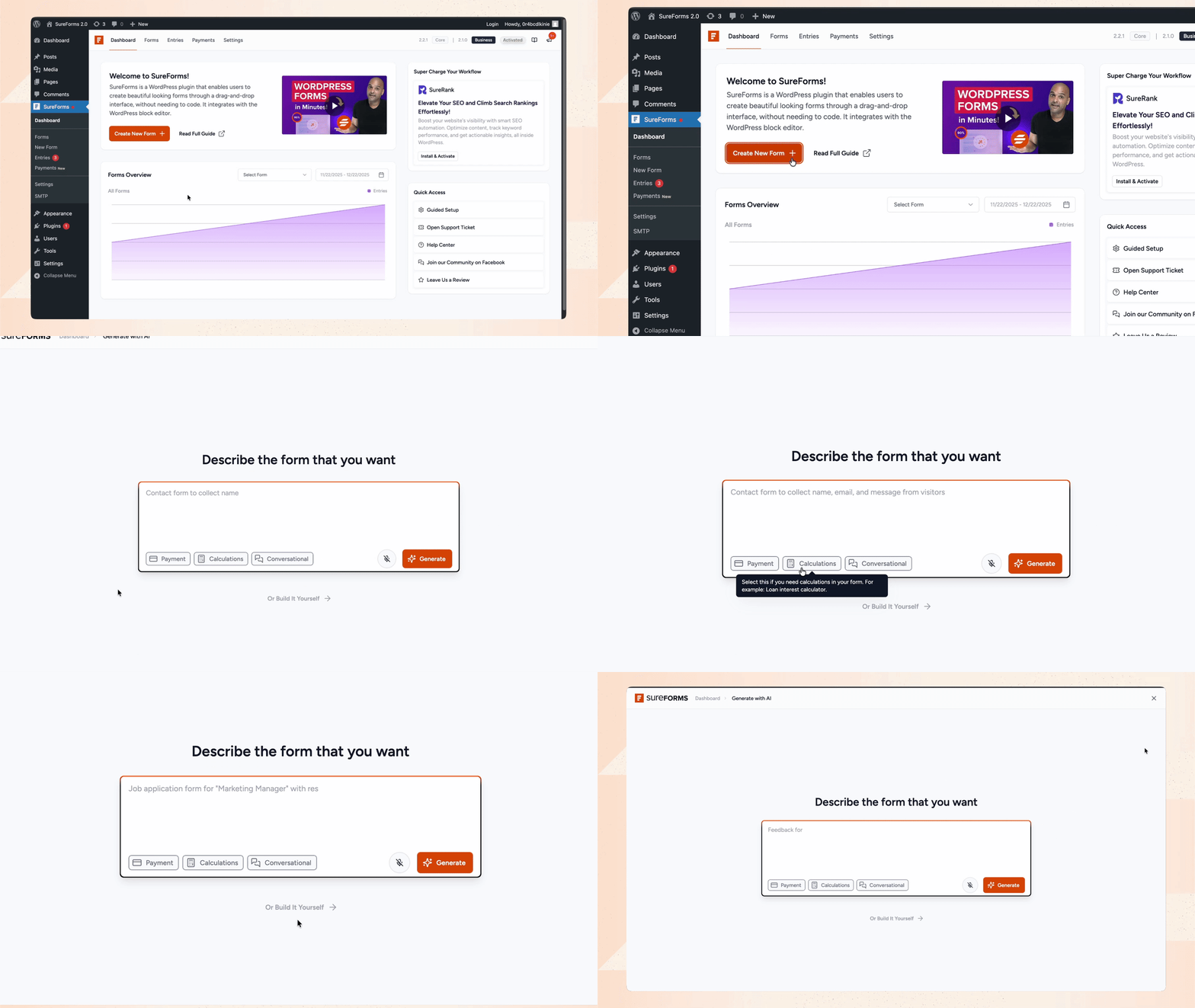
Start building your forms within minutes using SureForms. Build a form from scratch with drag and drop, or let AI generate one for you from a simple prompt.
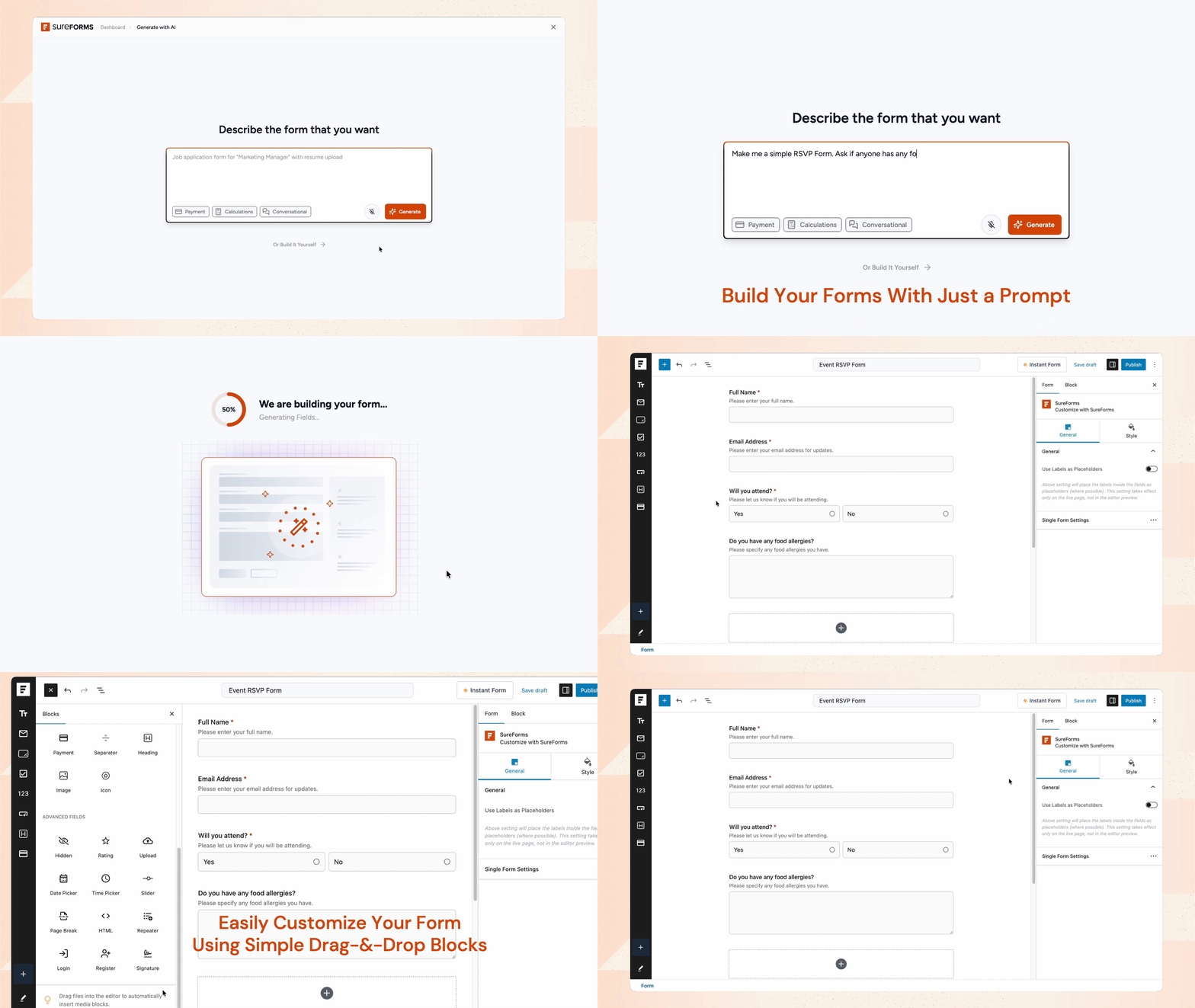
AI form builder for WordPress — describe the form you need and SureForms creates it instantly with smart field suggestions. Add, remove, or rearrange fields as you need.
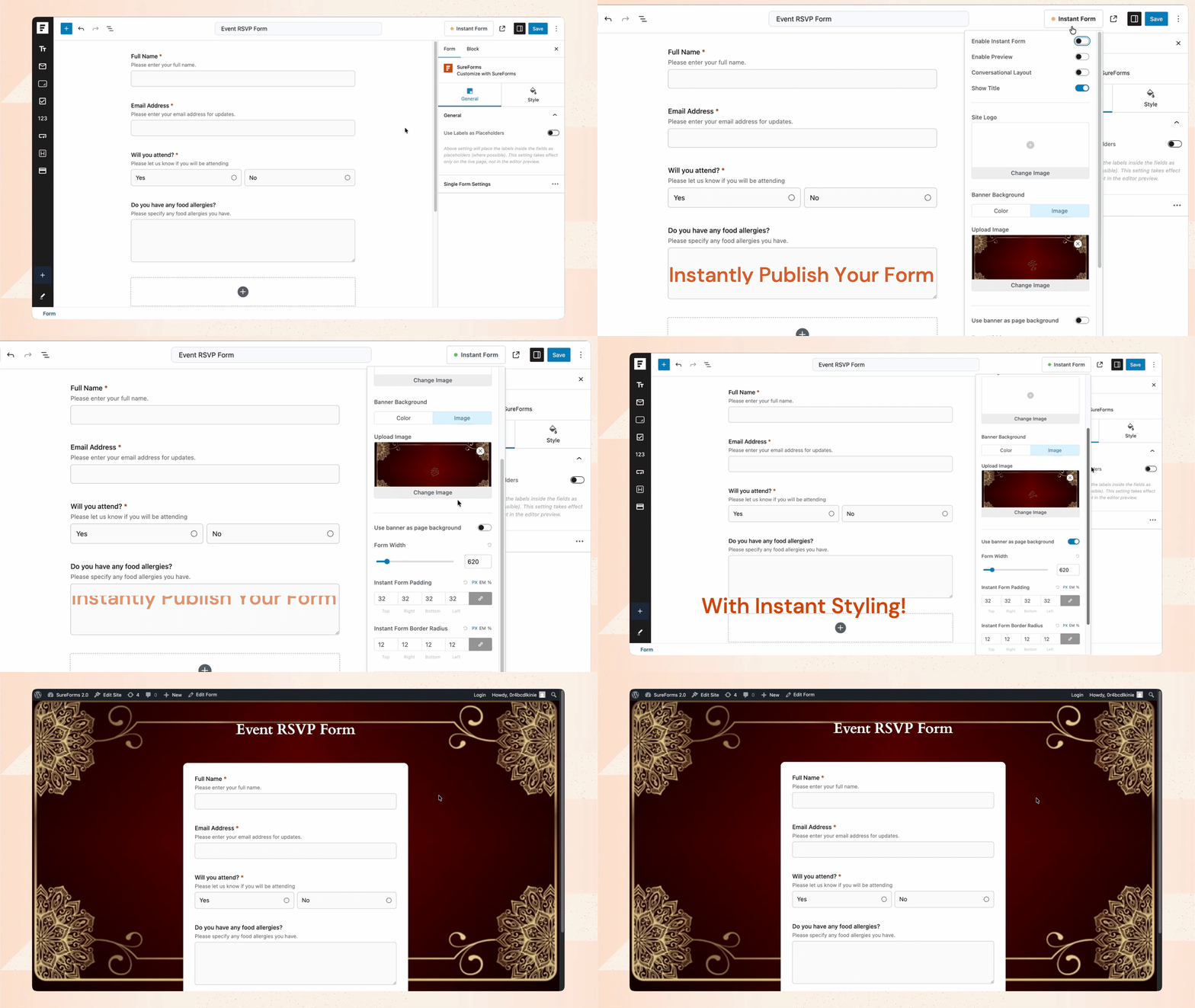
Beautify your forms with Instant Form Styling and a wide range of Block and Form Settings — customize colors, typography, spacing, and every visual detail.
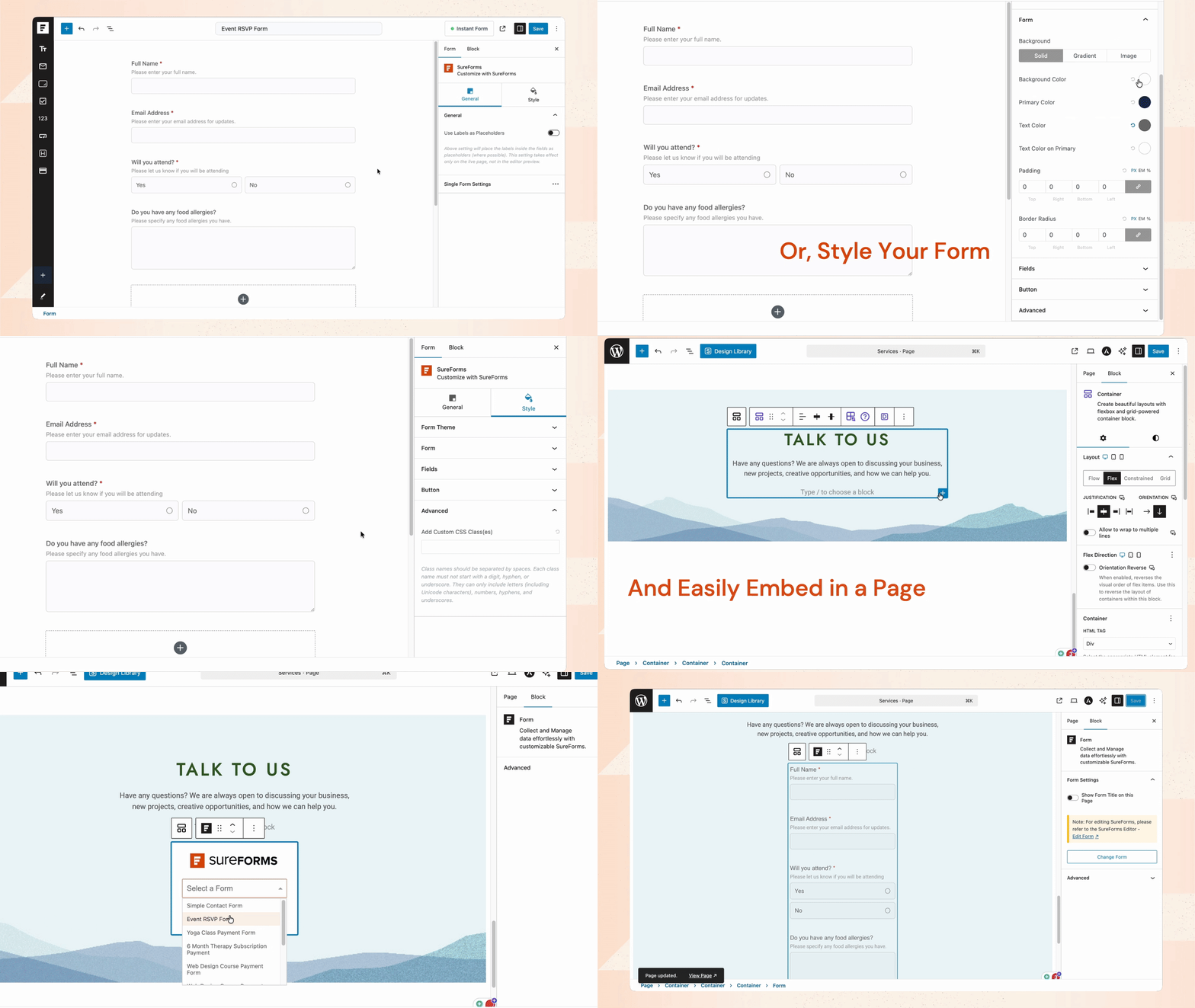
Publish your forms instantly with a shareable Instant Form link, or easily embed forms in any page or post using SureForms' native Gutenberg block.
Plugins semelhantes


Ativar o editor "clássico" anterior e o estilo antigo da tela Editar Post com TinyMCE, Meta Boxes, etc. Suporta todos os plugins que estendem esta tela.

The growing library of 300+ ready-to-use templates that work with all WordPress themes including Astra, Hello, OceanWP, GeneratePress and more

Ativa a tela clássica de configuração de widgets em Aparência > Widgets e em Personalizar. Desativa o editor de blocos ao gerenciar widgets.

Amplia e aprimora o editor de blocos (Gutenberg) e o editor clássico (TinyMCE).

Power-up Gutenberg with advanced blocks for faster website creation. Build your WordPress website effortlessly using powerful building blocks!
Do mesmo author (Brainstorm Force)
The growing library of 300+ ready-to-use templates that work with all WordPress themes including Astra, Hello, OceanWP, GeneratePress and more

Powerful Elementor addon with advanced Elementor widgets, templates, WooCommerce widgets & Header-Footer builder to build professional websites fa …
Power-up Gutenberg with advanced blocks for faster website creation. Build your WordPress website effortlessly using powerful building blocks!

Every store loses sales to cart abandonment. But with Cart Abandonment Recovery for WooCommerce, you can win them back—automatically.

Custom Fonts is a powerful WordPress plugin that allows you to upload your own custom fonts or choose from a vast collection of Google Fonts, all host …

SureRank – SEO Assistant with Meta Tags, Social Preview, XML Sitemap, and Schema