

Hostel
Hospedagem WordPress com plugin Hostel
Onde devo hospedar o plugin Hostel?
Este plugin pode ser hospedado em qualquer provedor que tenha WordPress configurado. Recomendamos optar por um provedor de hospedagem confiável, com servidores adaptados para WordPress, como o serviço de hospedagem de sites da MCO2.
Hospedando o plugin Hostel em um provedor seguro
A MCO2, além de configurar e instalar o WordPress na versão mais atual para seus clientes, disponibiliza o plugin WP SafePress, um sistema singular que assegura e melhora seu site conjuntamente.
Por que a Hospedagem WordPress funciona melhor na MCO2?
A Hospedagem WordPress funciona melhor pois a MCO2 possui servidores otimizados para WordPress. A instalação de WordPress é diferente de uma instalação trivial, pois habilita imediatamente recursos como otimização automática de imagens e fotos, proteção da página de login, bloqueio de atividades maliciosas diretamente no firewall, cache avançado e HTTPS ativado por padrão. São plugins que potencializam seu WordPress para a máxima segurança e o máximo desempenho.
Create your hostel, small hotel, or BnB site with WordPress.
Hostel is online booking system with easy back-end management.
You can publish the booking forms, room calendars, and room lists with shortcodes so the plugin fits any WordPress theme.
funcionalidades
- Manage your booking mode: accept Paypal, manual payments, or don’t allow online booking
- Manage email notifications
- Manage rooms, beds, and prices
- Set unavailable dates when you are on vacations or just don’t want to accept guests in some rooms
- Manage bookings, process payments, contact customers
- List your rooms by using shortcodes
- Supports iCal / .ics to synchronize bookings with online systems. You can export and import bookings to/from all popular booking sites like Booking.com, AirBnB.com, Hotels.com etc.
- Localization / translation – ready
- Mobile / touch – friendly
There are more and better features + premium support in the PRO version. Check it on our new site: wp-hostel.com
Começando
- Go to Hostel link in your admin menu to manage your rooms and rates.
- Use the shortcodes to install a list of your rooms or to add the booking code to a post or page where you have described your rooms.
- Set up unavailable dates if you have such.
Codigos
-
[wphostel-list] will display a table with your available rooms. A date selector on the top lets the user choose dates of their visit and then the rooms list is updated. If you have enabled booking in your Hostel settings page, the table will also show “Book” button when appropriate. The button will automaically load the booking form. You can pass the attribute “max_days” to specify the maximum day interval that can be selected to show the table.
-
[wphostel-booking] displays a generic booking form with a drop-down selector for choosing room, and a date selector. If you use the [wphostel-list] shortcode you most probably do not need this one because the booking form is automatically generated.
For translating the plugin check the Help page under the Hostel menu in your administration.
Community Translations
The following translations are currently available. Please note they are maintained by volunteer translators and we can’t guarantee their accuracy.
Spanish: wphostel-es_ES.mo | wphostel-es_ES.po
Capturas de tela

The options page let you set up currency, booking mode, and email settings

You can add any number of private and dorm rooms, specify price, bathroom etc

Add/Edit booking. As admin you can review and edit bookings made from users and manually add bookings made by phone or email
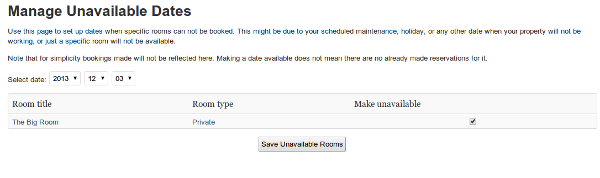
If there are any dates when your property or some rooms are not available, add them here

The Help page shows the available shortcodes.